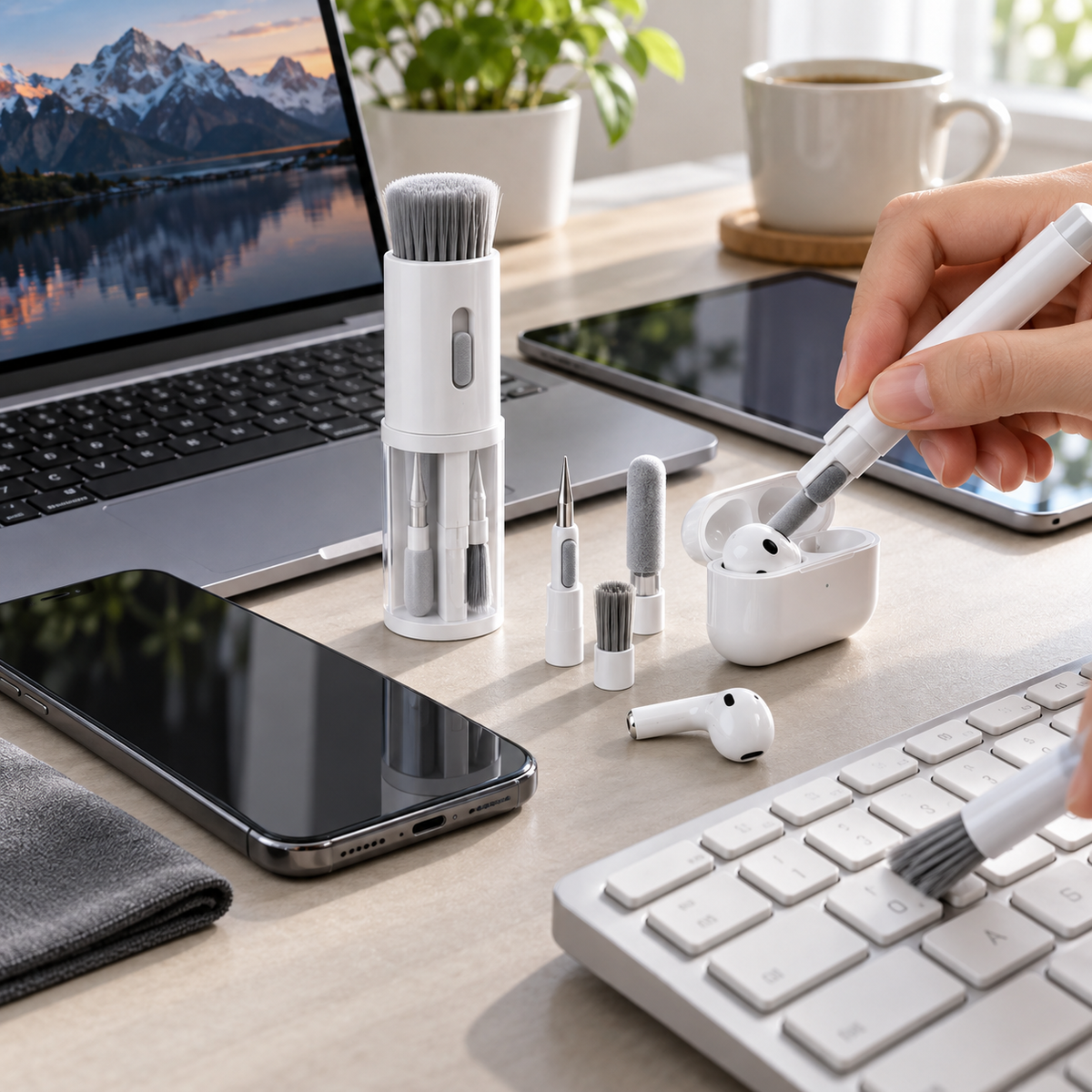
20-in-1 Electronic Device Cleaning Kit
20-in-1 Electronic Device Cleaning Kit
Couldn't load pickup availability
-
Ordered
- - -
Order Ready
- - -
Delivered

20-in-1 Electronic Device Cleaning Kit
Product Overview
This White 20-in-1 Electronic Device Cleaning Kit is designed to provide multiple cleaning and maintenance tools in one compact storage unit. The integrated design combines soft brushes, precision cleaning tools, a microfiber screen-cleaning surface, a keycap removal tool, earbud cleaning tools, and other accessories for maintaining phones, laptops, keyboards, earbuds, tablets, and similar electronic devices. The white version does not include cleaning liquid. The complete kit measures approximately 8.9 × 5.7 cm / 3.50 × 2.24 in and weighs approximately 145 g / 5.11 oz, making it suitable for desks, home offices, travel bags, and everyday device maintenance.
Key Features
- 20-in-1 Multi-Function Design: Combines multiple electronic-device cleaning and maintenance tools within one compact organizer.
- Soft Bristle Brush: Dense soft bristles help remove loose dust and debris from keyboards, device surfaces, vents, and similar areas.
- Microfiber Cleaning Surface: Soft microfiber material is designed for wiping compatible phone, tablet, laptop, and other display surfaces.
- Earbud Cleaning Tools: Precision cleaning components help remove loose debris from compatible earbud cases, openings, and small recessed areas.
- Precision Cleaning Tip: Narrow cleaning tool helps reach small gaps, seams, ports, and other difficult-to-access areas.
- Keycap Removal Tool: Integrated keycap puller provides convenient access beneath compatible removable keyboard keycaps during cleaning.
- Keyboard Cleaning Brush: Brush structure is designed to help remove dust and crumbs from spaces around keyboard keys.
- Integrated Phone Stand: Built-in support structure can be used as a compact stand for compatible mobile devices during suitable stationary use.
- Integrated Storage: Cleaning accessories are stored within or around the main body to help reduce loose components during storage.
- Compact Portable Structure: Small integrated design is suitable for desk drawers, backpacks, travel bags, and workspaces.
- No Cleaning Liquid Included: This version is supplied without cleaning solution or cleaning liquid.
- Reusable Cleaning Accessories: Suitable components can be cleaned and reused for regular device-maintenance tasks.
Product Specifications
| Feature | Details |
|---|---|
| Product Name | 20-in-1 Electronic Device Cleaning Kit |
| Product Type | Multi-Function Electronics Cleaning Tool Set |
| Color | White |
| Function Configuration | 20-in-1 |
| Main Materials | ABS Plastic, Metal and Microfiber Cloth |
| Product Size | Approximately 8.9 × 5.7 cm / 3.50 × 2.24 in |
| Product Weight | Approximately 145 g / 5.11 oz |
| Package Dimensions | Approximately 6.9 × 10 × 6.5 cm / 2.72 × 3.94 × 2.56 in |
| Cleaning Liquid | Not Included |
| Brush Type | Soft Bristle Cleaning Brush |
| Screen Cleaning Surface | Microfiber Cloth Surface |
| Precision Cleaning | Small Tips and Narrow Cleaning Tools |
| Keyboard Accessory | Integrated Keycap Puller |
| Earbud Cleaning | Precision Earbud Cleaning Tools |
| Phone Support Function | Integrated Device Stand |
| Storage Design | Integrated Compact Tool Storage |
| Primary Use | Electronic Device Cleaning and Dust Removal |
| Suitable Devices | Phones, Tablets, Laptops, Keyboards, Earbuds, Earbud Cases and Similar Compatible Electronics |
| Package Includes | 1 × White 20-in-1 Electronic Device Cleaning Kit Without Cleaning Liquid |
Cleaning Functions
- Keyboard Surface Cleaning: Use the soft brush to remove loose dust and debris from keyboard surfaces and spaces around keys.
- Keycap Area Cleaning: Use the keycap puller on compatible removable keycaps when deeper cleaning underneath the keys is required.
- Screen Wiping: Use the microfiber cleaning surface to gently wipe compatible phone, tablet, laptop, and similar displays.
- Earbud Cleaning: Use the precision cleaning tools to remove loose debris from compatible earbud surfaces and recessed areas.
- Earbud Case Cleaning: Narrow tools can help reach compatible charging-case cavities and small interior spaces.
- Port and Crevice Cleaning: Precision tips can be used carefully around compatible device seams, openings, and small gaps.
- Device Dust Removal: Soft bristles can help remove loose dust from laptop surfaces, vents, keyboards, and other suitable areas.
- Phone Stand Function: Deploy the integrated support structure when a compatible mobile device stand is needed.
Usage Instructions
- Select the Appropriate Tool: Choose the cleaning component suitable for the device area being cleaned.
- Power Off Devices: Turn off and disconnect electronic devices before cleaning ports, keyboards, openings, or other sensitive areas.
- Remove Loose Dust: Use the soft brush gently across keyboards, vents, seams, and exterior surfaces.
- Clean Small Areas: Use precision cleaning tips carefully around compatible earbuds, charging cases, ports, and narrow gaps.
- Wipe Screens: Use the microfiber cleaning surface with gentle pressure on compatible display surfaces.
- Remove Keycaps Carefully: Use the keycap puller only with keyboard keycaps designed to be safely removed.
- Return Tools to Storage: Place each accessory back into its designated storage position after use.
Care Instructions
- Keep the cleaning kit dry when not in use.
- Remove collected dust and debris from brushes regularly.
- Clean reusable microfiber surfaces according to their material requirements.
- Do not use excessive force on delicate ports, speakers, microphones, earbuds, or other small electronic components.
- Do not insert metal tools deeply into powered electronic devices.
- Turn off and disconnect devices before detailed cleaning.
- Avoid exposing the kit to open flames or excessive heat.
- Do not use abrasive chemicals on plastic or microfiber components.
- Allow cleaned accessories to dry completely before returning them to enclosed storage areas.
- Replace damaged tools if they become bent, cracked, excessively worn, or unsuitable for safe use.
Suitable Applications
- Laptop keyboard cleaning.
- Desktop keyboard cleaning.
- Phone screen cleaning.
- Tablet screen cleaning.
- Laptop display cleaning.
- Wireless earbud cleaning.
- Earbud charging case cleaning.
- Keyboard gap and crevice cleaning.
- Electronic device surface dust removal.
- Portable device maintenance at home, work, school, or while traveling.
Important Notes
This listing is for one white 20-in-1 electronic device cleaning kit without cleaning liquid. The product measures approximately 8.9 × 5.7 cm / 3.50 × 2.24 in and weighs approximately 145 g / 5.11 oz. The package measures approximately 6.9 × 10 × 6.5 cm / 2.72 × 3.94 × 2.56 in. This version does not include cleaning solution. Cleaning effectiveness may vary depending on the type of device, amount of dust or debris, surface condition, and cleaning method. Always confirm that individual tools and cleaning methods are suitable for the specific electronic device before use. Power off and disconnect compatible electronics before cleaning sensitive openings, ports, or internal areas. Dimensions and weight are approximate and may vary slightly due to manufacturing tolerances and manual measurement.
Collapsible row
Collapsible row